MiniMax H3 logoMiniMax H3
Loading

LoRA user guide

How to Use MiniMax H3 LoRAs

A practical workflow with model guidance, ready-to-use prompts, and examples for every LoRA available in the generator.

Camera Motion LoRA — User Guide


This LoRA helps MiniMax H3 follow camera directions more clearly. Use it when a shot needs a deliberate push-in, pull-back, orbit, tracking move, aerial move, pan, tilt, or close-up.

I. Trigger words (required)

camera motion

Place this at the beginning of the prompt. It activates the LoRA's camera-motion controls; follow it with the specific camera move and scene.

II. Recommended Strength

Use a strength between 0.8 and 1.0. A value of 0.8 produces gentler movement, while 1.0 makes the requested camera move more explicit. Values above 1.2 may destabilize the image.

III. Using This LoRA

Select MiniMax H3 Camera Motion LoRA in the generator, place the trigger words at the beginning of the prompt, and describe the camera direction in plain language.

IV. Writing the Prompt

Recommended Prompt Pattern

Write the prompt in this order so the subject, setting, camera move, and visual style are easy to understand:

camera motion, [subject], [scene], [camera-movement description], [lighting/style], [image quality]

Start with a Ready-to-Use Prompt

This guide covers nine useful camera-movement categories: push-in, pull-back, combined push/pull, orbit, tracking, aerial, crane/tilt, pan, and macro. Copy an example, then replace the subject and setting with your own. For example:

camera motion, a woman and a man in athletic wear, engaged in a dynamic rooftop martial arts fight with punches and defensive blocks, nighttime urban cityscape background, slow push-in to medium shot transitioning to slight pull-back as the woman falls, cinematic teal-orange grading, water droplet effects, sharp 4k, high production quality

Change the Scene, Keep the Camera Move

Replace [subject], [scene] with your own content while keeping the camera-movement phrase after the comma:

camera motion, [your subject], [your scene], slow push-in with subtle lateral tracking, cinematic color grading, 4k, high quality

Change the Camera Move, Keep the Scene

Replace only the camera-movement phrase (for example, slow push-inslow orbit) and leave everything else unchanged.

Complete Examples by Movement Type

① Push-in (martial arts / night scene)

camera motion, a woman and a man in athletic wear, engaged in a dynamic rooftop martial arts fight with punches and defensive blocks, nighttime urban cityscape background, slow push-in to medium shot transitioning to slight pull-back as the woman falls, cinematic teal-orange grading, water droplet effects, sharp 4k, high production quality

② Pull-back (industrial / volumetric light)

camera motion, two men in a dynamic martial arts fight, exchanging kicks and punches with defensive blocks and dodges, inside a vast abandoned industrial warehouse with crumbling pillars and dramatic shafts of sunlight, slow pull-back combined with gentle orbit around the fighters revealing the full scale of the environment, cinematic gritty texture, natural volumetric lighting, high production quality

③ Orbit (traditional setting / snow)

camera motion, two martial artists in white and dark robes, dueling with sword and fan atop a snow-covered pavilion surrounded by swirling vortex energy, misty mountain landscape with weeping willow, dynamic pull-back from close-up vortex to wide establishing shot revealing the full rooftop confrontation, cinematic wuxia fantasy style, ethereal atmospheric lighting, 4k, high quality

④ Handheld Tracking (action / rainy neon night)

camera motion, a man and woman in athletic wear, engaged in intense martial arts combat with punches kicks and takedowns, nighttime rooftop with wet pavement reflecting neon city skyline, dynamic handheld camera with push-in and slight tracking following action, cinematic teal-orange color grading, sharp 4k, high quality

⑤ Aerial (nature / mountains and rivers)

camera motion, majestic green mountain peaks and misty valleys, aerial drone descending over cloud-wrapped ridges, low-angle water-level shot of splashing stream, two hikers crossing stone bridge, mountain forest with flowing creek, slow aerial push-in, water-level tracking, static wide, cinematic natural lighting, 4k, high quality

⑥ Miniature Set (macro / desktop diorama)

camera motion, a miniature seasonal village diorama on a desk, transforming through autumn, winter, and spring with changing foliage and weather effects, office desk environment with computer monitor and stationery, slow push-in dolly glide across the diorama surface revealing each season transition, whimsical miniature aesthetic, soft natural lighting, 4k, high quality

The complete set covers all nine camera-movement categories with 55 prompts.

Test Video

Camera-Movement Strength and Direction

RequirementsHow to Write
SofterAdd slow: slow push-in
More dynamicAdd dynamic or aggressive: dynamic handheld / aggressive push-in
Specify directionpush-in from left / orbit right / pan left

Camera Movements Covered by This LoRA

TypesEffectsSuggestions
Push-in★★★ Most stableslow push-in / dolly in / push in
Pull-back★★★ Most stablepull-back / dolly out
Handheld★★★ Besthandheld tracking shot/dynamic handheld
Surround★★☆ Stableslow orbit/orbit around
Aerial★★☆ Stableaerial drone shot/flyover
Crane / tilt★★☆ Stablecrane reveal / tilt up/down
Push-Pull Combination★★☆ Stablepush-in then pull-back
Pan★☆☆ Weakpan left/pan right (sample is small, it is recommended to overlap other words)
Macro/Close-Up★★☆ Stableclose-up/macro/extreme close-up
Try the Camera Motion LoRA online

Wushu Action LoRA for MiniMax H3

Wushu Action LoRA is designed for readable martial-arts movement: punches, kicks, blocks, grappling, weapon work, footwork, weight transfer, and impact reactions. The recommended setup uses Wushu Action at 0.5 strength. Pairing it with Spatial Physics at 0.3 can add more convincing contact, balance, recoil, and environmental response.

Very fast action can blur hands, feet, or body positions. Keep each movement specific and avoid packing too many techniques into the same moment when body clarity matters.

Comparison videos

With Wushu Action LoRA at 0.5

Without the LoRA

Trigger word

Start the prompt with wushu_action. The trigger helps the model prioritize martial-arts choreography over generic movement.

Recommended structure:

wushu_action, [subject], [specific techniques and body mechanics], [environment], [camera direction], [visual finish]

The movement section is the most important part. Name the exact technique, the direction of force, how weight shifts, and how the opponent reacts.

Prompt-building guide

Subjects

  • a martial artist
  • two fighters
  • a wushu practitioner
  • a martial artist with a staff, sword, or spear

Movement and impact

  • rapid punches and kicks
  • blocks, counters, and evasive footwork
  • a spinning kick with a balanced landing
  • coordinated hip and shoulder rotation
  • grounded footwork and forward lunges
  • sword slashes, thrusts, and controlled parries
  • realistic recoil after contact

Environments

  • an indoor training studio
  • a traditional dojo
  • an outdoor arena
  • a bamboo forest in morning mist
  • a rain-soaked urban alley
  • a temple courtyard at sunrise

Camera direction

  • full-body shot with a stable camera
  • medium handheld follow shot
  • low-angle tracking shot
  • wide establishing shot
  • controlled orbit around the fighters
  • brief whip pan on impact

Ready-to-use prompts

Solo combination

wushu_action, a martial artist performs a rapid combination of punches and spinning kicks with strong hip rotation, precise weight transfer, and a balanced landing, indoor training studio, full-body shot, stable camera, sharp motion and realistic body mechanics.

Two-fighter exchange

wushu_action, two martial artists exchange strikes at close range, blocking and countering with grounded footwork, visible recoil, and controlled balance, outdoor arena, medium handheld follow shot, dust lifted by each step, cinematic natural light.

Sword sequence

wushu_action, two warriors in traditional robes perform a fast sword exchange with measured slashes, thrusts, parries, and evasive steps, misty bamboo forest, wide shot moving into a controlled orbit, atmospheric light and crisp motion.

Modern street fight

wushu_action, two fighters in casual clothes move through a fast close-range exchange of jabs, hooks, blocks, and a takedown attempt, wet urban alley at night, neon reflections, low handheld camera, gritty realism and restrained camera shake.

Large battle

wushu_action, a coordinated group battle with multiple martial artists moving in clear foreground and background layers, flags crossing the frame, sweeping crane shot at golden hour, readable choreography, realistic impacts, cinematic scale.

Camera and audio direction

Keep camera movement specific and limited. A stable full-body view usually preserves choreography better than constant shaking. Use a single short impact shake, whip pan, or height change only when it supports a named action.

For sound, describe breath, foot contact, cloth movement, weapon friction, controlled impacts, water splashes, and environmental ambience. Leave room between major hits so each action remains readable.

Common failure prevention

  • Avoid vague phrases such as “epic fight” without naming techniques.
  • Do not stack several incompatible camera moves into one moment.
  • Keep the number of active fighters manageable when precise choreography is required.
  • State how each movement begins, makes contact, and resolves.
  • Use realistic balance, recoil, and landing language to reduce floating motion.

Secondary trigger option

Some trained material also responds to kungfu combat. Put it at the start of the prompt and use the same structure: subject, technique, environment, camera, and finish. Use one trigger consistently rather than mixing several trigger phrases in the same prompt.

Try the Wushu Action LoRA online

Spatial Physics LoRA (MiniMax-H3)

This LoRA helps objects move and interact more convincingly, including collisions, stacking, falling, bouncing, rolling, and passing behind one another.

This LoRA focuses on object physics.

Results can vary in crowded scenes or when many objects collide at once. Use a strength between 0.3 and 0.5 for a gentle improvement without overpowering the original scene.

Video Comparison

The actual test uses this LoRA, and the video as a whole enhances the realistic physical logic, such as the realistic feedback of the object collision. It can also be used in some fighting scenes, the effect of real collisions of characters.

** martial arts fragment using space physics LoRA (intensity 0.3) **

** No martial arts clip with space physics LoRA (same prompt) **

Additional Test Videos

How to Use It

  1. Select MiniMax H3 Spatial Physics LoRA in the generator.
  2. Use a strength between 0.3 and 0.5.
  3. Describe object motion with clear spatial and physics language in the prompt.

Helpful Words and Phrases

** ① Body/Scene **

  • several colored objects Multiple colored objects (clever style)
  • rigid objects Rigid bodies/elastic objects
  • metal objects
  • a ball/balls
  • billiard balls billiards
  • objects common objects
  • on a table Tabletop (PhyCo Pool Scene)
  • in a synthetic scene (clever style)

** ② Physical behavior **

  • collision/colliding collisions
  • a single collision between objects
  • bouncing/rebound
  • with visible impact and bounce
  • with minimal bounce
  • rolling into a wall
  • scattering scattering
  • momentum transfer
  • In the in motion movement

** ③ Spatial Consistency Phrase (Key!) **

  • clear spatial layout
  • visible depth Visible depth
  • consistent trajectories consistent trajectories
  • gravity-consistent/gravity-consistent movement
  • gravity-consistent rebound trajectories
  • objects maintaining spatial relationships
  • realistic restitution Realistic restoration coefficient (resilience)
  • rigid collision with momentum transfer

What to Avoid

If the result looks unstable, add a short list of unwanted visual problems. Avoid instructions that contradict the movement you requested:

blurry, distorted, low quality, jittery motion, objects passing through each other, objects floating without gravity, morphing shapes, inconsistent lighting, flickering

Prompt example (can be used directly)

** Collision class **

  1. several colored objects, a single collision between objects, metal objects with rigid, elastic collisions, clear spatial layout, visible depth, objects maintaining spatial relationships in a synthetic scene
  2. several colored objects, objects colliding with visible impact and bounce, clear spatial layout, gravity-consistent trajectories
  3. objects colliding with visible impact and bounce, clear spatial layout, gravity-consistent trajectories

** Bounce/Release Class ** 4. Elastic objects bouncing with realistic restitution, clear spatial layout, gravity-consistent rebound trajectories 5. objects bouncing with realistic restitution, clear spatial layout, gravity-consistent rebound 6. a ball rolling into a wall and rebounding with minimal bounce, clear spatial layout, visible depth, rigid collision with momentum transfer

** Multi-object scattering/billiards ** 7. billiard balls colliding and scattering on a table, momentum transfer between balls, clear spatial layout, visible depth 8. several balls on a table, a ball striking the group, momentum transfer, balls scattering with realistic collision, clear spatial layout, gravity-consistent

** Trajectory/No Collision Class ** 9. Rigid objects in motion with clear spatial layout, consistent trajectories, gravity-consistent movement and visible depth 10. several colored objects, objects moving with consistent trajectories, no collision, clear spatial layout, visible depth, objects maintaining spatial relationships in a synthetic scene

** Freeform template ** (substitute verb) 11. a ball thrown across the scene, [parabolic arc / gravity-consistent trajectory], clear spatial layout, visible depth 12. two balls colliding in mid-air, clear spatial layout, consistent trajectories, gravity-consistent rebound, visible depth


## Combining It with Another LoRA

Spatial Physics can be paired with Wushu Action when a fight scene needs clearer contact, balance, recoil, and reactions from nearby objects. Keep Spatial Physics at a low strength so it supports the action rather than changing the whole shot.
Try the Spatial Physics LoRA online

Anime Video Line Art Colorization (MiniMax-H3 LoRA)

This LoRA turns a line-art video into a colored anime sequence while preserving the original movement and composition. Describe the character, clothing, colors, lighting, and setting you want to see in the finished clip.

Examples

Prompts

Prompts can directly describe the visual content. The prompts used in the three examples above are as follows:

  • Prompt 1: A shy, blushing girl with long blue hair in white clothes and a frosty headband, sitting against a glacial ice wall with a bashful expression, surrounded by floating ice shards and soft magical glow.
  • Prompt 2: A shy, blushing girl with long black hair in a yellow top, white headband, and pink bow, sitting against a plain white wall with a gentle, bashful expression, softly and evenly lit from the front.
  • Prompt 3: A shy, blushing girl with long red hair in a white top, black headband, and pink bow, sitting on a bed in a bedroom bathed in bright, golden sunset light. Warm orange and amber rays stream through the window, illuminating the scene with a radiant glow as her gentle, bashful expression is softly highlighted by the luminous evening atmosphere.

Alternatively, editing instructions can be used as prompts, allowing the model to determine the visual content autonomously:

  • Editing prompt: Generate anime videos from line art outlines.
Try the Lineart Anime LoRA online

MiniMax H3 Inpainting LoRA — User Guide

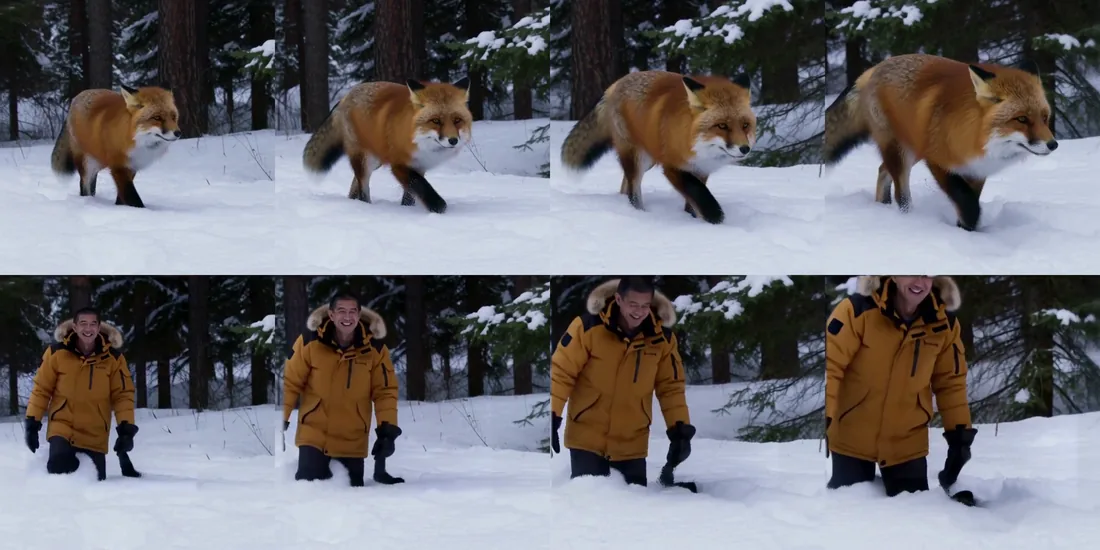
Use this LoRA to replace or repair one selected part of a video while leaving the rest of the clip as close to the source as possible. It can change a subject, product, sign, or damaged area while preserving the background, camera movement, timing, and existing sound.

source above, repainted below

<sub>Above: the plate. Below: the same clip with the animal replaced from one reference photo, in 6 steps. The forest, the snow, the camera push and the original soundtrack are untouched.</sub>

How It Works

You mark the area that may change and describe the replacement. The selected area is regenerated while the unselected area is preserved. A clean, consistent selection gives the model a clearer boundary and usually produces a more natural edit.

Use a Clear Selection

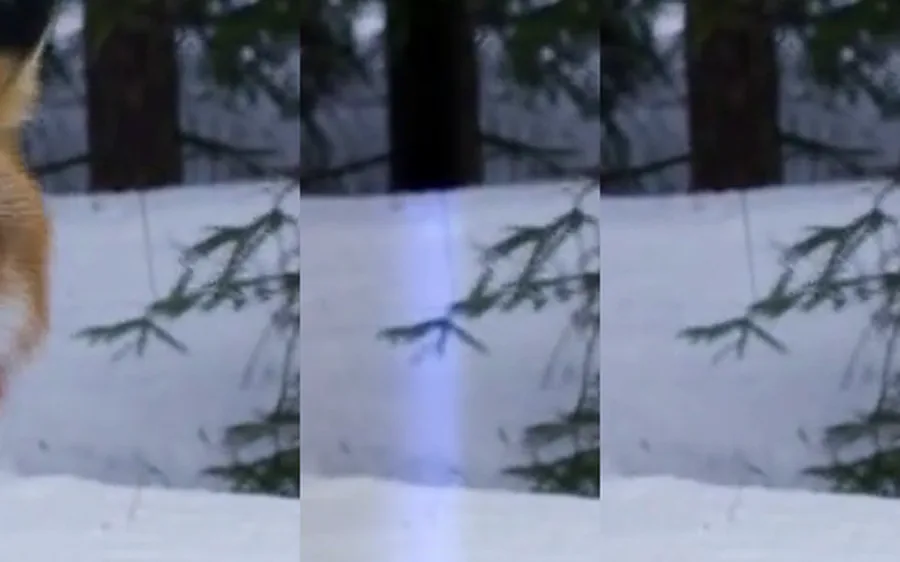
plate, feathered mask, hard mask

<sub>Original frame · soft selection · clear selection at the same boundary.</sub>

A very soft selection can create a blurry band where the new content meets the original frame. Use a firm selection around the area you want to replace, then use a small amount of edge blending only when joining the finished edit back into the source.

Give the Selected Area Enough Room

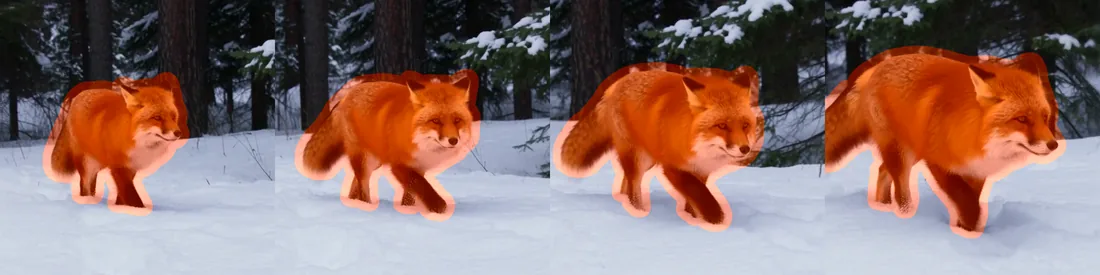
a tracked selection with extra room

The shape of the selected area limits what can fit inside it. If you replace a small animal with a standing person, the selection must include enough height and width for the new pose. When replacing an entire subject, leave space around the original outline instead of tracing it too tightly.

A stable crop should cover everything the mask touches across the whole clip. Keep the canvas at its original size, then feather the edited area back into the source. Processing cost follows the canvas size rather than the amount of the frame that changes, so a focused crop is the practical way to keep the edit efficient.

Practical Tips

  • Keep the original soundtrack when the new subject should follow existing speech, rhythm, or timing.
  • Describe each shot clearly. Name the replacement subject, appearance, action, lighting, and how it should fit the scene.
  • Add a reference image when the replacement must match a specific product, character, or visual identity.
  • Work in 5–15 second sections. Split longer videos into shorter edits for more consistent results.
  • Check the boundary after rendering. If nearby pixels change slightly, tighten the final blend to the selected area.
Try the Inpainting LoRA online

MiniMax H3 Realism People LoRA

Trigger word: r34l1sm

A LoRA adapter for MiniMax H3 specialized in realistic people: faces that hold up in close-up, natural skin texture, believable expressions and gestures, film-style lighting, and documentary camera movement.

Before / after

Same prompt, same seed — base model first, then the same generation with the adapter enabled.

The comparison contains 19 pairs. The only variable is the LoRA. The trigger word is present on both sides, so the trigger itself is not doing the work. Each pair plays the base model first, then freezes and dims while the adapted version plays beside it.

The scenes include close-up talking faces, arguments, several people speaking at once, weathered skin, children, ritual scenes, and travel footage. The complete comparison runs for 197 seconds at 1920×1080.

What it does

MiniMax H3 is already a strong general video model. This adapter pushes it further on human-centered shots: portraits, faces, hands at work, crowds, and everyday characters. Skin keeps its texture instead of smoothing out, eyes and micro-expressions stay coherent, light behaves like it does on a film set, and motion gains a subtle handheld quality. It keeps MiniMax H3's native synchronized audio.

It replaces an earlier realism adapter and was retrained on a larger dataset focused on people.

How to use it here

Start the prompt with the trigger word r34l1sm, then describe the scene. The generator inserts the trigger automatically when you select this LoRA.

A strength of 1.0 is the intended setting. Use 0.6–0.8 for a lighter touch. It works with text to video, image to video, and reference to video.

Prompt example

r34l1sm, a young woman faces the camera in a quiet apartment at dusk, soft window light on her skin, shallow depth of field, subtle handheld sway, cinematic, photorealistic

Training

The training set contains 176 hand-curated live-action clips centered on people, including portraits, faces, workers, athletes, and everyday characters. Slow-motion footage was retimed to natural speed, and the clips were normalized to 24 frames per second with structured scene captions.

Sixteen training configurations were compared through side-by-side human review using the same prompt and seed with the adapter enabled and disabled. The selected version uses rank 32 and 1,500 training steps at the high-resolution setting. The comparison found that training resolution mattered more than simply increasing rank or training duration because skin texture, pores, fine hair, and film grain depend on high-frequency visual detail.

License

The adapter follows the MiniMax H3 Community License of the base model.

Continue with the dedicated page

Read the MiniMax H3 Realism People LoRA guide for the full workflow, pricing, use cases, prompt advice, and frequently asked questions.

Try the Realism People LoRA online

MiniMax H3 Acc LoRAs — User Guide


MiniMax H3 Acc LoRAs are designed to shorten the wait for a finished video. Use this option when you want to test prompts, compare creative directions, or refine a scene more quickly.

I. What This Option Does

The Acc LoRAs focus on generation speed rather than adding a new visual style. Your prompt still controls the subject, setting, movement, lighting, and overall look of the video.

There are two supported ways to begin:

  • Text and keyframe video: start with a prompt, one image, or a first and last image.
  • Reference-guided video: start with approved images, video clips, or audio that provide creative direction.

You do not need to download model files or install anything when using the online generator.

II. When to Choose MiniMax H3 Acc LoRAs

Choose this option when you are testing several versions of an idea, adjusting a prompt one detail at a time, or creating short drafts before selecting a final direction.

The Acc LoRAs do not add a specific camera move, art style, or character look. Choose one of the other LoRAs when your main goal is a specialized visual effect.

III. How to Use It Online

  1. Open the MiniMax H3 LoRA Generator.
  2. Open the LoRA Model selector and choose MiniMax H3 Acc LoRAs.
  3. Choose how you want to start: text, images, or reference media.
  4. Describe the scene in plain language and select the video settings.
  5. Generate the video, review the result, and adjust the prompt if needed.

No trigger word is required. The generator sends the selected Acc LoRAs option with your prompt automatically.

IV. Ready-to-Use Prompt

The example below shows a quiet cinematic close-up beside a window. Paste the prompt as a starting point, then change the subject, setting, or camera direction to fit your idea.

an intimate cinematic close-up of an elderly woman standing beside a sunlit window, her eyes reflecting quiet emotion as she slowly turns toward the light, natural skin texture, soft warm daylight, blurred city background, shallow depth of field, subtle camera push-in, realistic motion

V. Example Video

This comparison video was published by Alibaba PAI for the MiniMax H3 Acc LoRAs release.

VI. Before You Generate

  • Use a short, clear prompt for the first test.
  • Keep the subject and main action easy to identify.
  • Change one part of the prompt at a time when comparing results.
  • Review motion and scene detail instead of judging speed alone.

For all official comparison videos and a plain-language explanation of both supported workflows, visit the MiniMax H3 Acc LoRAs page.

Try the MiniMax H3 Acc LoRAs LoRA online

Put the MiniMax H3 LoRA Workflow Into Practice

Choose an available LoRA, follow its matching guide, and test the prompt online.

Choose a LoRA to try